Manage your digital footprint
Paperweight scans your inbox to map your digital footprint, then helps you take back control and delete your data. Local-first and open source.
Your inbox knows where your data lives.
macOS · Windows · Linux
See it in action
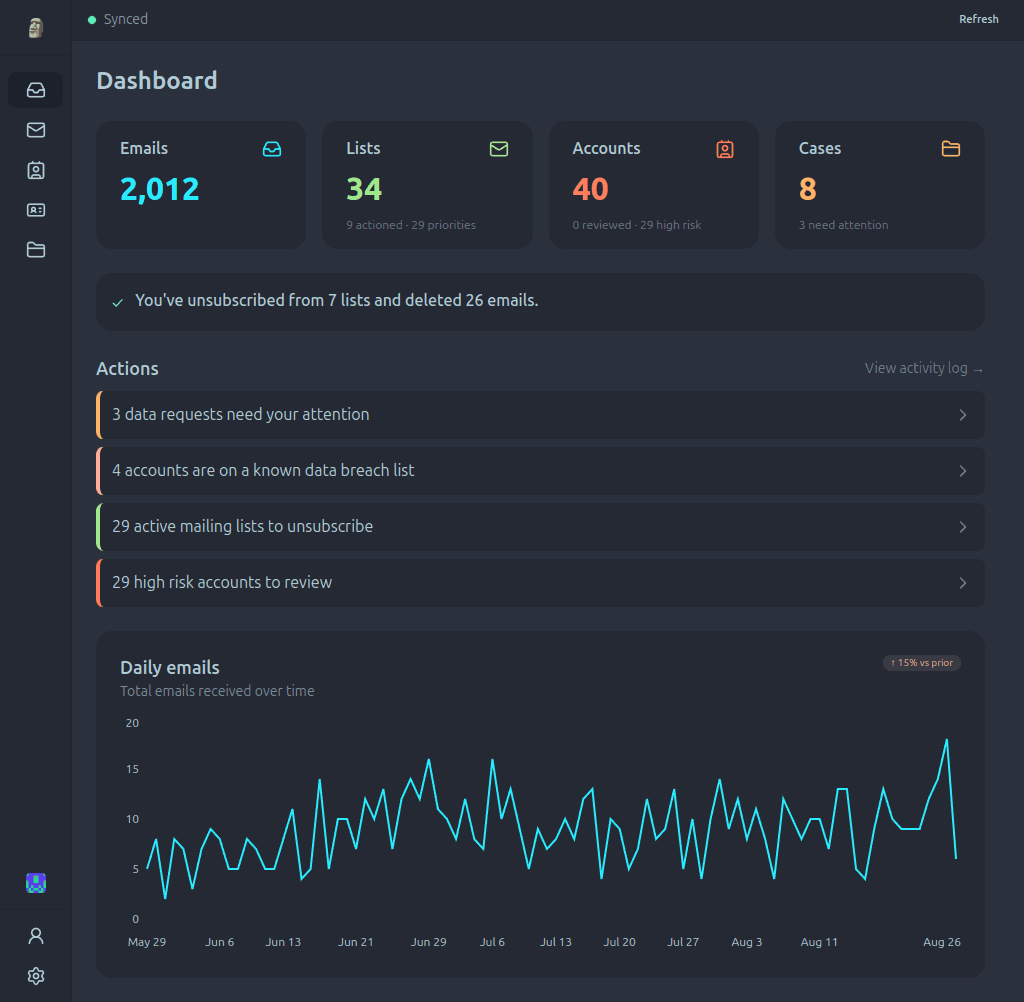
Review companies, mailing lists, and personal data found in your email history.
Three ways to reduce your digital footprint
Turn your email history into a practical view of old accounts, unwanted mailing lists, and exposed personal data.
Find old accounts
Reconstruct forgotten services and company relationships from sign-up messages, receipts, password resets, and security alerts.
Bulk unsubscribe
Compare active mailing lists, identify the senders creating the most noise, and unsubscribe at the source.
Remove personal data
Find phone numbers, addresses, payment details, and identifiers in past messages, then prepare deletion requests.
Built for privacy from the ground up
A privacy tool that reads your data in the cloud is not a privacy tool. Paperweight connects directly to your provider and stays on your computer.
100% local processing
All analysis runs on your device. There are no Paperweight servers and your emails are never shared with anyone.
Open source and auditable
Publicly available under the permissive MIT license. Inspect the code, verify our claims, or build it yourself.
Review before action
You stay in complete control. Review sender evidence and request templates before anything is sent.
The walk-away test
Your email stays on your computer. Discover and curate for free, then choose Pro when you want to take action.
Frequently asked questions
What does Paperweight do?
Paperweight connects directly to your inbox on your machine. It reconstructs an inventory of accounts you have created, finds active mailing lists with real unsubscribe options, and detects exposed personal data so you can request deletion.
How is Paperweight different from online cleanup services?
Most email cleanup tools scan your inbox on their cloud servers, and some monetize that data. Paperweight runs 100% locally on your computer. There are no intermediary servers, no telemetry, and no data collection.
Should I unsubscribe from spam messages?
No. Only unsubscribe from legitimate senders and recognizable companies. For suspicious or unknown spam, use your provider's spam reporting button so you do not confirm that your address is active.
Which email providers are supported?
Paperweight supports Gmail, Outlook, Proton Mail via Proton Bridge, and standard IMAP email accounts.
What is included in Free and Pro?
Free includes one email account, full-history sync, account and mailing-list discovery, breach and personal-data overviews, and local curation. Pro adds unsubscribe, trash, spam, bulk cleanup, sending privacy requests, multiple accounts, and MCP access.
Supported email providers
Works with any IMAP provider
Works with any provider that offers IMAP access
Download Paperweight
Download and try Paperweight free.
If download does not start, get the latest release from GitHub Releases.
Latest version: v1.0.0 · All releases
Installation notes
- Windows: Run the installer. If Windows SmartScreen shows a warning, click "More info" and then "Run anyway" to proceed.
- macOS: Open the downloaded DMG and drag Paperweight to your Applications folder.
- Linux AppImage: Right-click → Properties → Permissions → check "Allow executing file as program", or run
chmod +x Paperweight*.AppImage. - Linux deb: Double-click the file to install, or run
sudo dpkg -i Paperweight*.deb.
Free gives you the full picture
Discover and curate one email account with full history for free. Pro lets you act on it. Choose $5/month, billed yearly at $60, or a $25 Cleanup Pass for 30 days of full Pro access.
Crypto: $55 for one year of Pro, renewed manually, or $25 for a Cleanup Pass.
GDPR Request Generator
Access or delete your data with a pre-filled GDPR request. Choose your action, select an organization, add your details, and copy or open the generated email template.
Or find more information about your local data protection authority.
Latest Data Breaches
Recent breach guides with impact details and what to do next.