Find and remove personal data from companies
See where phone numbers, addresses, and payment details appear across your email history, then send targeted deletion requests and track the response.
macOS · Windows · Linux
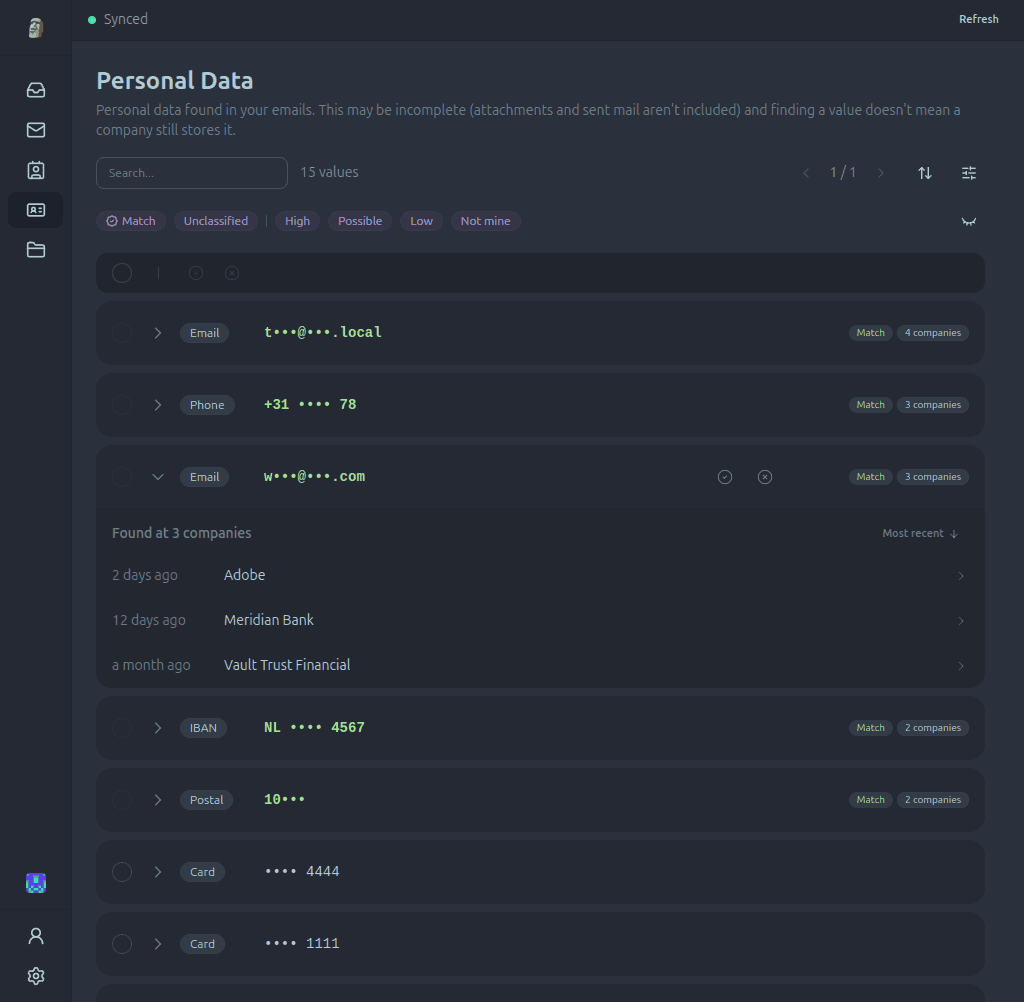
How personal data review works
Paperweight finds structured personal details in past messages, shows their context, and helps you prepare a focused request.
Find personal details
Identify email addresses, phone numbers, postal addresses, payment cards, IBANs, and national identifiers in past messages.
Review source and context
Inspect each finding alongside its source message and confirm which details belong to you.
Prepare a request
Use confirmed details and account evidence to draft an access or deletion request for review before sending.
Understand where your personal data appears
A list of values is not enough. Paperweight groups findings by company and message type so you can understand the relationship before deciding what to do.
Personal data it can recognize
Review the personal details found across receipts and messages:
Context around each finding
See whether each detail appears in a purchase, update, promotion, social message, or personal conversation:
Built for privacy from the ground up
A privacy tool that reads your data in the cloud is not a privacy tool. Paperweight connects directly to your provider and stays on your computer.
100% local processing
All analysis runs on your device. There are no Paperweight servers and your emails are never shared with anyone.
Open source and auditable
Publicly available under the permissive MIT license. Inspect the code, verify our claims, or build it yourself.
Review before action
You stay in complete control. Review sender evidence and request templates before anything is sent.
The walk-away test
Your email stays on your computer. Discover and curate for free, then choose Pro when you want to take action.
Frequently asked questions
How does Paperweight find exposed personal data?
Paperweight scans your message history locally using pattern recognition to detect phone numbers, postal addresses, payment cards, and identifiers, grouping every finding under the company that received it.
Does unsubscribing delete my personal data?
No. Unsubscribing only stops marketing emails. To remove account records, stored personal data, and transaction histories, you must submit a formal data deletion request.
Does Paperweight remove records from data brokers?
No. Paperweight focuses on first-party relationships found in your actual inbox. For public broker listings, manual removal or dedicated broker scrubbers are the appropriate tool.
Can a company refuse a deletion request?
Under regulations like GDPR and CCPA, companies must delete personal data unless they have a legal requirement to retain it (such as tax records or active dispute resolution).
Does Paperweight send emails automatically?
No. Every deletion request is drafted for your review first. You inspect the recipient, template, and included evidence before sending it from your own email client.
Explore other features
Choose the part of your email history that you want to explore or clean up.
Review your personal data footprint
Discover and curate your footprint free with one email account and full history. Pro adds cleanup, privacy requests, multiple accounts, and MCP access.