Find accounts linked to your email
Every service you sign up for and every online purchase is connected to your email address. Most people have over 100 forgotten accounts, creating unnecessary security risks and privacy exposure.
macOS · Windows · Linux
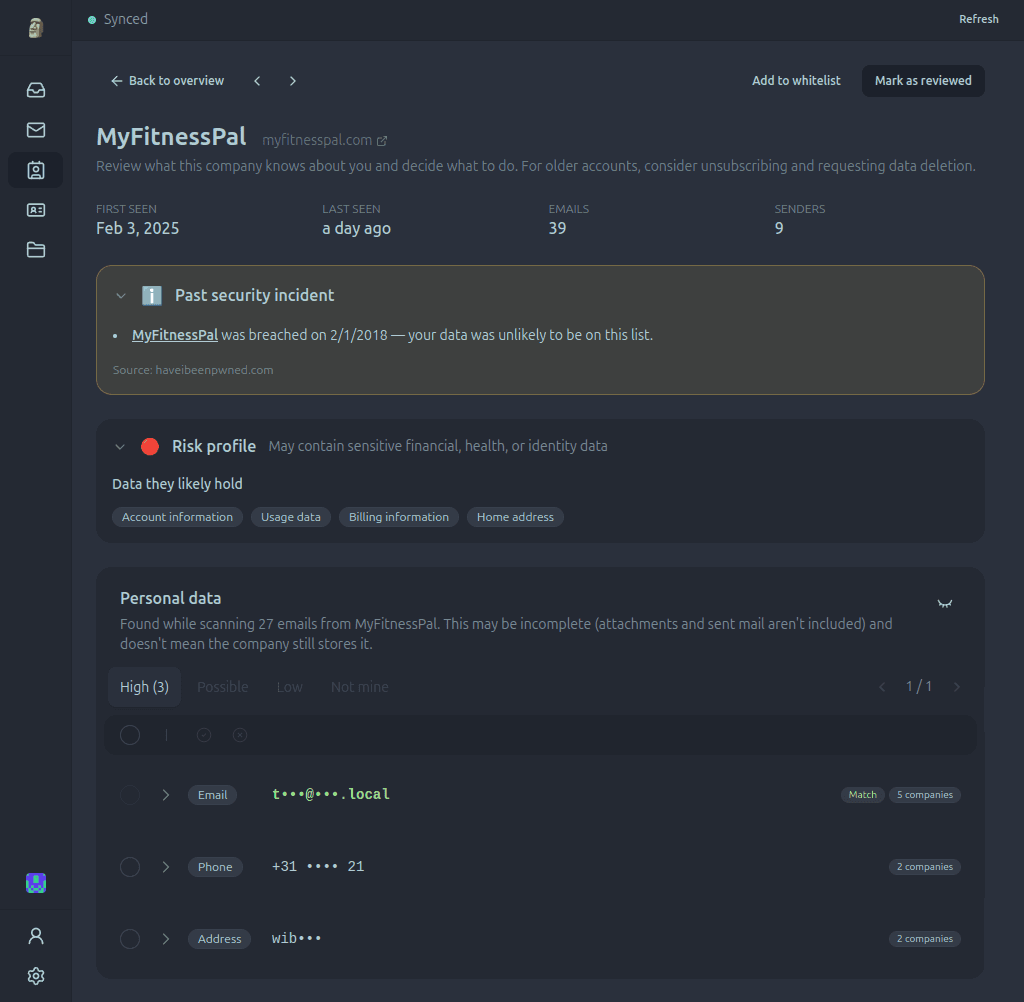
How Paperweight finds old accounts
Your inbox already contains evidence of the shops, apps, and services you have used. Paperweight turns that history into a company-by-company inventory.
Connect your inbox
Connect Gmail, Outlook, Proton Mail via Bridge, or any standard IMAP mailbox directly in the app.
Find evidence of past accounts
Welcome messages, receipts, password resets, and security alerts reveal services you have used, even when you no longer remember them.
Review each company
See first and last contact, message counts, account evidence, detected personal data, and known breach history in one place.
Why forgotten accounts matter
An account can outlive the reason you created it. Old services may still retain your contact details, purchase history, or other personal information.
Find what memory misses
Recover one-off purchases, old subscriptions, and services that would be difficult to inventory manually.
Prioritize potential risk
See which relationships are inactive, which companies appear in known breach records, and where personal details appear in messages.
Take informed action
Use the evidence to decide what to keep, unsubscribe from, or follow up with an access or deletion request.
Built for privacy from the ground up
A privacy tool that reads your data in the cloud is not a privacy tool. Paperweight connects directly to your provider and stays on your computer.
100% local processing
All analysis runs on your device. There are no Paperweight servers and your emails are never shared with anyone.
Open source and auditable
Publicly available under the permissive MIT license. Inspect the code, verify our claims, or build it yourself.
Review before action
You stay in complete control. Review sender evidence and request templates before anything is sent.
The walk-away test
Your email stays on your computer. Discover and curate for free, then choose Pro when you want to take action.
Frequently asked questions
How does account discovery work?
Paperweight connects directly to your email provider and analyzes your message history on your device. It identifies sign-up confirmations, order receipts, and password resets to reconstruct an inventory of services you have used.
What if I deleted my old welcome emails?
Paperweight searches for password resets, order updates, invoices, and security alerts in addition to sign-up emails. If all messages from a company were permanently deleted, it cannot be discovered.
Does finding an account mean it is still active?
No. Paperweight discovers historical relationships based on emails in your inbox. It gives you the evidence you need to decide whether to log in, close the account, or request deletion.
Can I delete accounts directly from Paperweight?
Paperweight generates pre-filled GDPR and CCPA deletion request emails with your account evidence attached, allowing you to send official deletion requests with a single click.
Which email providers are supported?
Paperweight supports Gmail, Outlook, Proton Mail via Proton Bridge, and any standard IMAP provider.
Does Paperweight upload or store my emails?
No. All analysis and database storage remain 100% local on your computer. Your credentials and messages never touch Paperweight servers.
Explore other features
Choose the part of your email history that you want to explore or clean up.
Build your account inventory
Discover and curate your footprint free with one email account and full history. Pro adds cleanup, privacy requests, multiple accounts, and MCP access.