Unsubscribe from unwanted emails in bulk
Find active mailing lists, compare which senders create the most noise, and stop recurring email at the source.
macOS · Windows · Linux
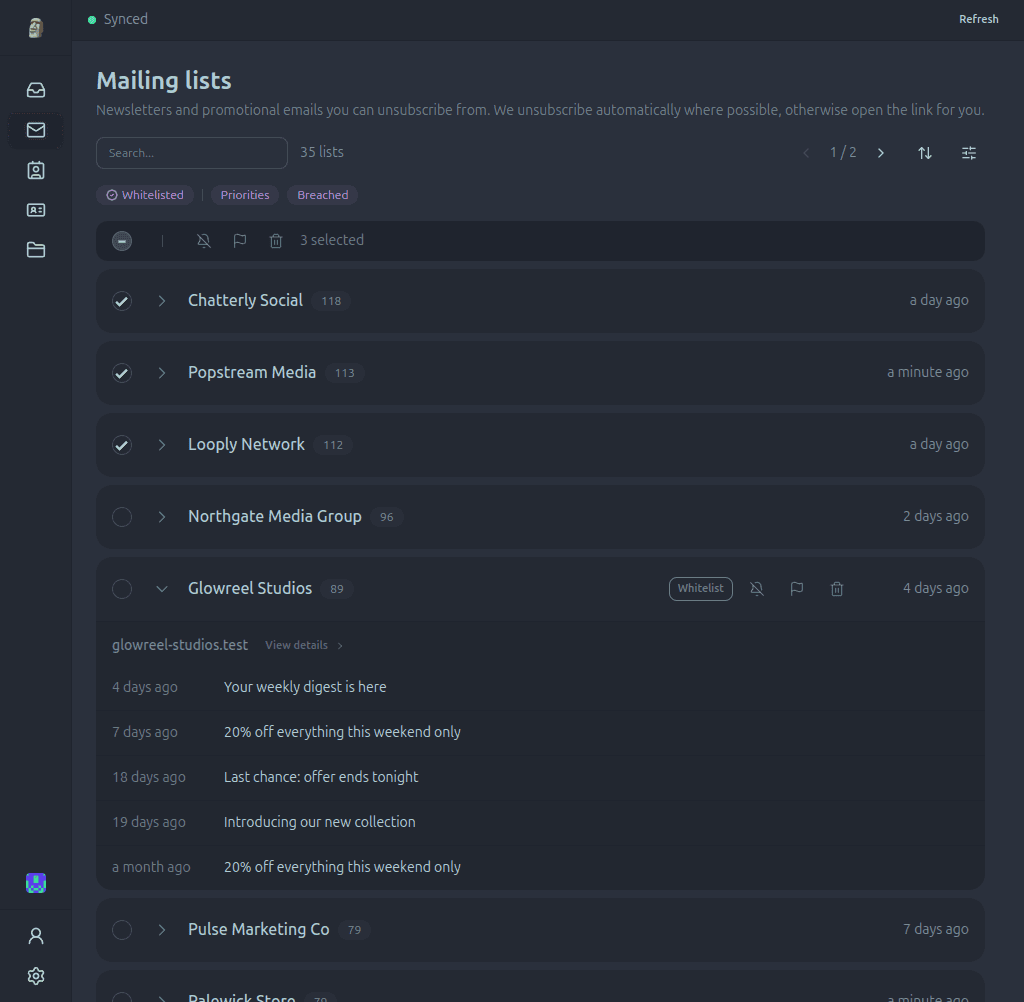
How email cleanup works
Paperweight separates actionable mailing lists from the rest of your mail, then lets you review and unsubscribe in one place.
Find mailing lists
Identify newsletters and promotional senders that include a usable unsubscribe method.
Compare sender activity
Compare message counts and latest activity so recurring sources of inbox noise are easy to spot.
Confirm unsubscriptions
Choose legitimate senders you recognize and send supported one-click or email unsubscribe requests.
Stop unwanted email at the source
Inbox rules only hide recurring mail. Paperweight helps you leave legitimate mailing lists so new messages stop being sent.
Prioritize the biggest senders
Use message volume and recent activity to start with the mailing lists having the greatest impact on your inbox.
Keep what you still value
Review each sender before acting so useful newsletters, receipts, and account updates remain untouched.
Unsubscribe for real
Use standards-based one-click or email unsubscribe methods instead of creating filters that only hide future messages.
Built for privacy from the ground up
A privacy tool that reads your data in the cloud is not a privacy tool. Paperweight connects directly to your provider and stays on your computer.
100% local processing
All analysis runs on your device. There are no Paperweight servers and your emails are never shared with anyone.
Open source and auditable
Publicly available under the permissive MIT license. Inspect the code, verify our claims, or build it yourself.
Review before action
You stay in complete control. Review sender evidence and request templates before anything is sent.
The walk-away test
Your email stays on your computer. Discover and curate for free, then choose Pro when you want to take action.
Frequently asked questions
How does Paperweight unsubscribe from senders?
Paperweight uses standard RFC 8058 one-click headers, automated unsubscribe mailto triggers, or direct sender links. It performs real unsubscriptions rather than simply hiding or archiving emails behind client-side rules.
Is it safe to unsubscribe from spam?
Unsubscribe only from legitimate senders and services you recognize. For spam or suspicious emails, use your provider's spam reporting tool instead of clicking links or sending confirmation emails.
Does Paperweight create inbox filter rules?
No. Paperweight triggers real unsubscribe requests with the sender, meaning you stop receiving messages at the source rather than filling your spam/trash filters.
Can I manage subscriptions across multiple accounts?
Yes. With Pro, you can connect multiple Gmail, Outlook, Proton Bridge, or IMAP inboxes and triage mailing lists across all of them.
Does Paperweight upload or share my email data?
No. All message analysis and unsubscribe actions are initiated directly from your device. No email content or credentials ever reach Paperweight servers.
Explore other features
Choose the part of your email history that you want to explore or clean up.
Clean up unwanted subscriptions
Discover and curate your footprint free with one email account and full history. Pro adds cleanup, privacy requests, multiple accounts, and MCP access.